
 By Titik Puspa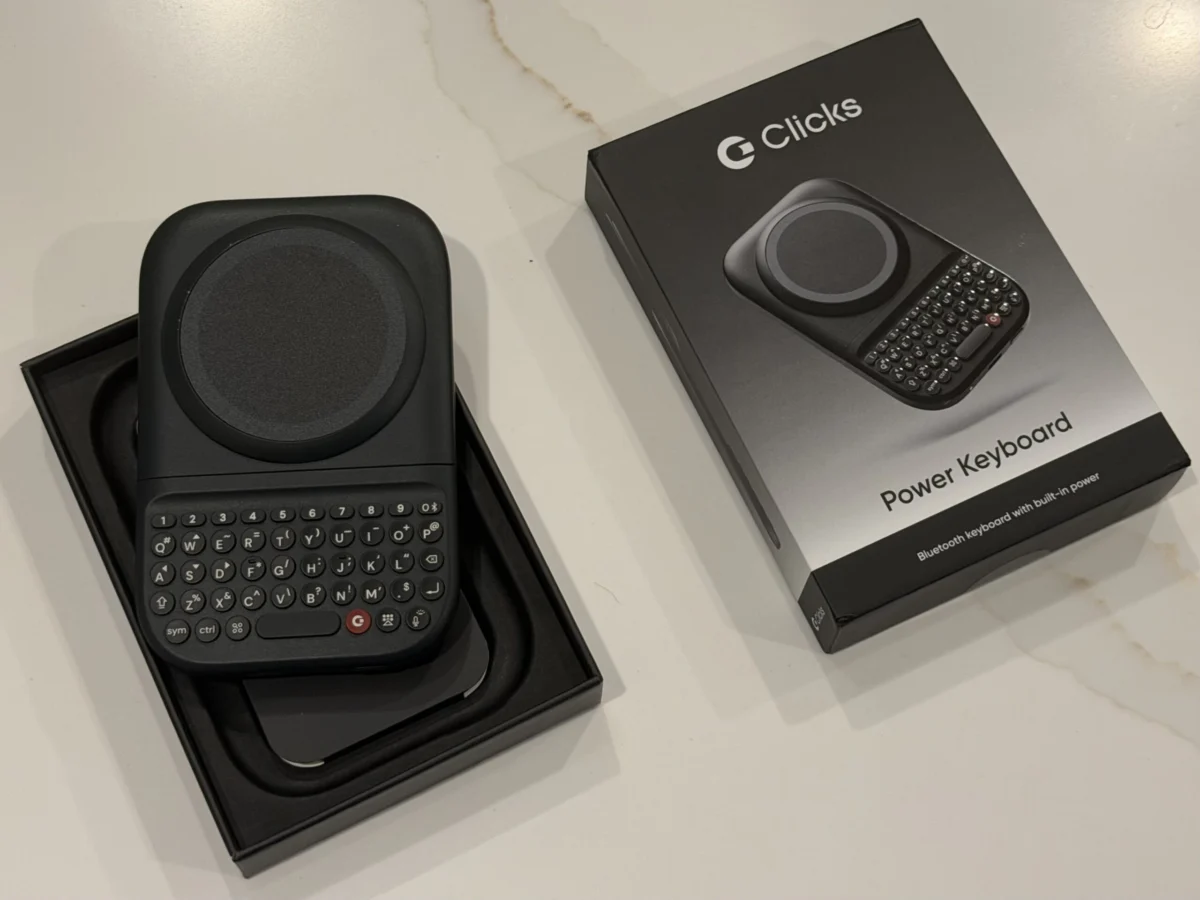
Clicks Technology, a startup with a fervent mission to revive the physical keyboard on smartphones, has begun shipping its MagSafe-compatible Power Keyboard, now priced at $99. This move comes after a series of anticipated delays, with the company confirming that by the end of last week, a substantial 75% of pre-orders from the initial batch had been dispatched to eager customers. This physical keyboard accessory, designed to evoke the tactile satisfaction of classic BlackBerry devices, serves as a tantalizing prelude to Clicks Technology’s own forthcoming smartphone, the aptly named Clicks Communicator.
The Power Keyboard is engineered for versatility, aiming to breathe new life into a wide array of mobile devices. Its innovative slide-out design features tactile buttons and is adaptable to different phone sizes, allowing users to experience a BlackBerry-like typing sensation whether their phone is oriented in portrait or landscape mode. This accessory is more than just a peripheral; it’s a statement of intent from Clicks Technology, signaling their commitment to offering an alternative to the ubiquitous on-screen keyboards that dominate the modern smartphone landscape. The underlying philosophy is clear: to cater to those who yearn for the speed, accuracy, and reliability that only a physical keyboard can provide.

This current offering, however, inherits some of the challenges encountered with Clicks Technology’s earlier iteration, the Clicks keyboard case. While the previous product was an all-in-one case with an integrated keyboard, the Power Keyboard, as a snap-on accessory, can lead to a top-heavy feel, particularly when used with larger smartphones. During testing with devices like the iPhone 17 Pro Max and the Pixel 10 XL, the added weight and bulk in portrait mode proved to be a significant consideration, potentially impacting comfort and usability for extended typing sessions. Despite these ergonomic challenges, the craftsmanship of the Power Keyboard itself is commendable. It is meticulously constructed, suggesting that it could indeed appeal to a niche market of users who deeply miss the physical typing experience of their former BlackBerry devices.
Upon unboxing, the Power Keyboard presents itself as a premium product. It is thoughtfully packaged, complete with protective cling films to safeguard against scratches during transit and a comprehensive, full-color Quick Start guide to facilitate a smooth user experience. The initial setup involves charging the device via USB-C, though the review unit arrived with a pre-existing charge. Pairing with a smartphone over Bluetooth is initiated by pressing and holding the power button while sliding out the keyboard. The initial pairing process with an Android phone was seamless. However, transitioning to an iPhone presented a minor hurdle. Despite "forgetting" the device on the Android phone, it initially refused to pair with the iPhone. A careful re-examination of the instructions revealed a crucial detail: to add a second Bluetooth device, a number key must be pressed in conjunction with the power button. The Clicks mobile app is the designated tool for removing paired devices, a testament to the software integration supporting the hardware.
The physical attachment of the Power Keyboard to a smartphone is facilitated by MagSafe or Qi2 magnetic alignment technology. For users whose phones lack native support for these standards, an adhesive ring or a compatible phone case can be employed to establish the necessary magnetic connection. Once securely attached, the keyboard can be extended for typing. A notable feature is its adaptability to various phone sizes, ensuring compatibility with both standard and larger "Ultra" or "Pro Max" models. The satisfying click as the keyboard locks into place on its sliders is a subtle but appreciated detail. Furthermore, the keyboard incorporates an adjustable LED backlight, a practical addition for users who find themselves typing in low-light conditions.

The keys themselves offer a responsive, "clicky" tactile feedback and are strategically positioned for comfortable reach. While transitioning back to physical keys after years of relying on on-screen keyboards requires an adjustment period, the learning curve is perceptibly gentler compared to Clicks Technology’s earlier keyboard case. This suggests a significant iterative improvement based on user feedback and design refinements. A key advancement in the Power Keyboard is its independent power source. Unlike its predecessor, which drew power directly from the connected phone via USB-C, the Power Keyboard features a built-in 2,150 mAh battery. This not only frees up the phone’s battery but also introduces additional functionality.
The dimensions of the Power Keyboard are 119.7 x 76.6 x 15.2mm, and it adds approximately 180 grams of weight to the device. While this is relatively slim for a battery pack, it is substantial enough to make pocketability a concern, particularly for women’s clothing with shallower pockets. There’s also a slight risk of the keyboard sliding open unexpectedly if the phone and keyboard combination is forcefully inserted into a back pocket. However, this added heft is offset by a significant advantage: the integrated battery can provide wireless charging for MagSafe and Qi2 compatible devices. Users have granular control over this feature via the Clicks companion app, with options to disable wireless charging entirely, reserve a specific portion of the battery for the keyboard, or allow it to share its power.
Customization is another cornerstone of the Power Keyboard’s appeal. The dedicated Clicks key can be remapped to function as a Tab button, offering a familiar shortcut for many users. The "Cursor Mode," activated by pressing Sym + CMD, transforms certain letter keys into directional controls, enabling precise cursor movement on the screen. This level of configurability extends to the number row, where users can set up custom shortcuts. By pressing a number key alongside the Sym button, users can trigger functions like Esc, volume adjustments, media playback controls (play/pause), and page navigation (up/down).

Further enhancing its power-user appeal, the Power Keyboard integrates seamlessly with Apple Shortcuts. This allows users to assign specific keys to trigger a wide range of actions, from initiating calls and retrieving weather forecasts to controlling the flashlight, receiving AirDrops, and composing text messages. The Clicks app comes pre-loaded with several popular shortcuts, but users are empowered to create and implement their own custom automations. These advanced features, while powerful, are best appreciated by users who have become proficient with the physical keyboard. The initial learning curve, as mentioned, can be a factor, and Clicks Technology acknowledges that smaller, lighter phones or devices like the iPhone Air might offer a more immediate and comfortable typing experience. For larger devices, using the keyboard in landscape mode proved to be more conducive to comfortable typing during testing.
Typing with a protective iPhone case on also presented challenges, even with a relatively slim case. To optimize the experience, it was necessary to remove the case and use the iPhone bare. While this improved ergonomics, the overall comfort was still somewhat compromised due to the inherent size of the larger phone. Clicks Technology claims to have tested the Power Keyboard with a variety of devices, including the iPhone Air, 17 Pro, 17 Pro Max, 16 Pro, Pixel 9, Galaxy Fold, and various other Android models, suggesting a broad compatibility range.
Ultimately, the decision to purchase the Power Keyboard hinges on an individual’s nostalgia for the BlackBerry era and their willingness to adapt to its specific ergonomic considerations. For those deeply invested in the idea of a physical keyboard, it represents an affordable interim solution before the launch of Clicks Technology’s dedicated smartphone. Prototypes of the Clicks Communicator, which were tested at CES in January, demonstrated a more integrated and potentially more comfortable user experience. This is largely due to Clicks Technology having complete control over all technical specifications, a distinct advantage over creating an accessory designed to work with a multitude of external devices.

While the Power Keyboard performs its core function admirably, the trade-offs in comfort and portability lead to a personal preference for Clicks Technology’s forthcoming Communicator smartphone. The prospect of a device where the physical keyboard is intrinsically designed into the hardware, rather than being an add-on, holds significant appeal for a seamless and optimized experience.
However, the versatility of the Power Keyboard extends beyond its intended use with smartphones. Its ability to pair with any device supporting external Bluetooth keyboards opens up a range of other applications. Users could leverage it with tablets, smart TVs such as Apple TV, or even AR/VR headsets like the Apple Vision Pro. This could prove particularly useful for tasks that involve extensive text input, such as setting up new applications or navigating interfaces where cumbersome remote controls or voice input methods are the only alternatives. The ability to efficiently input email addresses and passwords on these devices via a familiar keyboard interface would be a significant convenience.
In conclusion, the Clicks Power Keyboard is a well-crafted accessory that successfully brings a physical keyboard experience to modern smartphones. It offers a compelling option for BlackBerry enthusiasts and productivity-focused users who prioritize tactile feedback and typing speed. While it presents some ergonomic challenges, particularly with larger devices, its customizability, independent power source, and potential for broader device compatibility make it a noteworthy product in the evolving landscape of mobile accessories. The true test of Clicks Technology’s vision, however, will be the eventual release of their dedicated smartphone, which promises a fully integrated physical keyboard experience.
